








- Why MARM MCP
- Quick Start
- Connect Your Client Fast
- Complete MCP Tool Suite
- MARM Dashboard
- Why MARM Holds Up
- Contributing
- Project Documentation
Your AI forgets everything. MARM MCP doesn't.
MARM MCP is a local memory infrastructure layer for AI agents. It gives Claude, Codex, Gemini, Qwen, IDE agents, and other MCP clients one persistent place to store decisions, retrieve context, reuse notebooks, and keep long-running work from drifting.
The point is not "more tools." MARM exposes 9 focused MCP tools and moves the heavy work behind the server: session routing, protocol delivery, semantic recall, serialized writes, rate-limit presets, write-time consolidation, and agent-assisted compaction.
| Layer | What it does | Why it matters |
|---|---|---|
| Memory model | Sessions, structured logs, notebooks, summaries, and semantic memories | Keeps project history searchable instead of trapped in one chat |
| Scale layer | SQLite WAL mode, connection pooling, serialized write queue, and HTTP rate-limit presets | Lets one server support solo use, multi-agent work, and swarm-style bursts |
| Intelligence layer | Semantic search, auto-classification, write-time consolidation, and compaction candidates | Keeps recall useful as memory grows instead of letting duplicates pile up |
| Deployment layer | Pip, Docker, STDIO, HTTP, --swarm, --swarm-max, and --trusted |
Lets you run private local memory or shared multi-agent memory with the same MCP surface |
marm-demo.mp4
MARM gives AI agents persistent local memory, shared context, write-queue safety, swarm presets, and compaction so recall stays clean.
Install once:
pip install marm-mcp-server| If you are... | Start the server | Connect your MCP client |
|---|---|---|
| Solo developer / researcher | python -m marm_mcp_server |
"agent" mcp add --transport http marm-memory http://localhost:8001/mcp |
| Private local STDIO user | marm-mcp-stdio |
"agent" mcp add --transport stdio marm-memory-stdio marm-mcp-stdio |
| Multiple agents sharing memory | python -m marm_mcp_server --swarm |
"agent" mcp add --transport http marm-memory http://localhost:8001/mcp |
| Private high-throughput swarm | python -m marm_mcp_server --swarm-max |
"agent" mcp add --transport http marm-memory http://localhost:8001/mcp |
| Trusted private lab/server | python -m marm_mcp_server --trusted |
"agent" mcp add --transport http marm-memory http://localhost:8001/mcp |
“MARM successfully handles our industrial automation workflows in production. We've validated session management, persistent logging, and smart recall across container restarts in our Windows 11 + Docker environment. The system reliably tracks complex technical decisions and maintains data integrity through deployment cycles.”
@Ophy21, GitHub user (Industrial Automation Engineer)
“MARM proved exceptionally valuable for DevOps and complex Docker projects. It maintained 100% memory accuracy, preserved context on 46 services and network configurations, and enabled standards-compliant Python/Terraform work. Semantic search and automated session logs made solving async and infrastructure issues far easier. Value Rating: 9.5/10 - indispensable for enterprise-grade memory, technical standards, and long-session code management.” @joe_nyc, Discord user (DevOps/Infrastructure Engineer)
- Local HTTP/STDIO = fastest single-machine setup.
- Docker HTTP = shared/always-on server (key required).
- Docker STDIO = private containerized local use (no HTTP key).
Swarm / multi-agent note: The write queue is enabled by default to serialize memory writes through one worker. For shared HTTP deployments, use --swarm (200 RPM) or --swarm-max (600 RPM) when starting the server. --trusted disables rate limiting entirely for private deployments. STDIO is still best for private single-agent/local use.
"agent" refers to claude, gemini, grok, qwen, or any MCP client. Codex uses --url instead of --transport to add MCP tools.
pip install marm-mcp-server
# most agents use this --transport command
"agent" mcp add --transport http marm-memory http://localhost:8001/mcp
codex mcp add marm-memory --url http://localhost:8001/mcp
# xAI / Grok Remote MCP. Use a hosted HTTPS MARM endpoint, not localhost.
python -m marm_mcp_serverpip install marm-mcp-server
# most agents use this --transport command
"agent" mcp add --transport stdio marm-memory-stdio marm-mcp-stdio"
codex mcp add marm-memory-stdio -- marm-mcp-stdio
# xAI / Grok Remote MCP. Use a hosted HTTPS MARM endpoint, not localhost.
python -m marm_mcp_server.server_stdioDocker HTTP requires an API key because it exposes MARM as a network server; STDIO stays local to the client process and does not need one.
# Step 1: generate key (do not add < > around the key)
docker run --rm lyellr88/marm-mcp-server:latest --generate-key

# Step 2: run server
docker pull lyellr88/marm-mcp-server:latest
docker run -d --name marm-mcp-server \
  -p 127.0.0.1:8001:8001 \
  -e SERVER_HOST=0.0.0.0 \
  -e MARM_API_KEY=your-generated-key \
  -v ~/.marm:/home/marm/.marm \
  lyellr88/marm-mcp-server:latest

# Step 3: connect client
"agent" mcp add --transport http marm-memory http://localhost:8001/mcp --header "Authorization: Bearer your-generated-key"
codex mcp add marm-memory --url http://localhost:8001/mcp --bearer-token-env-var MARM_API_KEY# --swarm: write queue on, 200 RPM — recommended for multi-agent shared servers
docker run -d --name marm-mcp-server \
-p 127.0.0.1:8001:8001 \
-e SERVER_HOST=0.0.0.0 \
-e MARM_API_KEY=your-generated-key \
-v ~/.marm:/home/marm/.marm \
lyellr88/marm-mcp-server:latest --swarmdocker run --rm -i \
-v ~/.marm:/home/marm/.marm \
--entrypoint python \
lyellr88/marm-mcp-server:latest \
-m marm_mcp_server.server_stdioMost useful support info:
- Docker HTTP requires a key; Docker STDIO does not.
- If you get
401, verify key match and client restart after env var changes. - For full key setup, rotation, and troubleshooting: INSTALL-DOCKER.md
Claude Code remains the recommended first setup path, but MARM also works with other MCP clients and IDE agents.
CLI clients - Claude Code · Codex · Gemini CLI · Qwen CLI · Linux variants · Docker/key
IDE agents - VS Code / Copilot Agent · Cursor · Docker/key IDE setup
Remote/API platforms - xAI / Grok Remote MCP · Platform integration
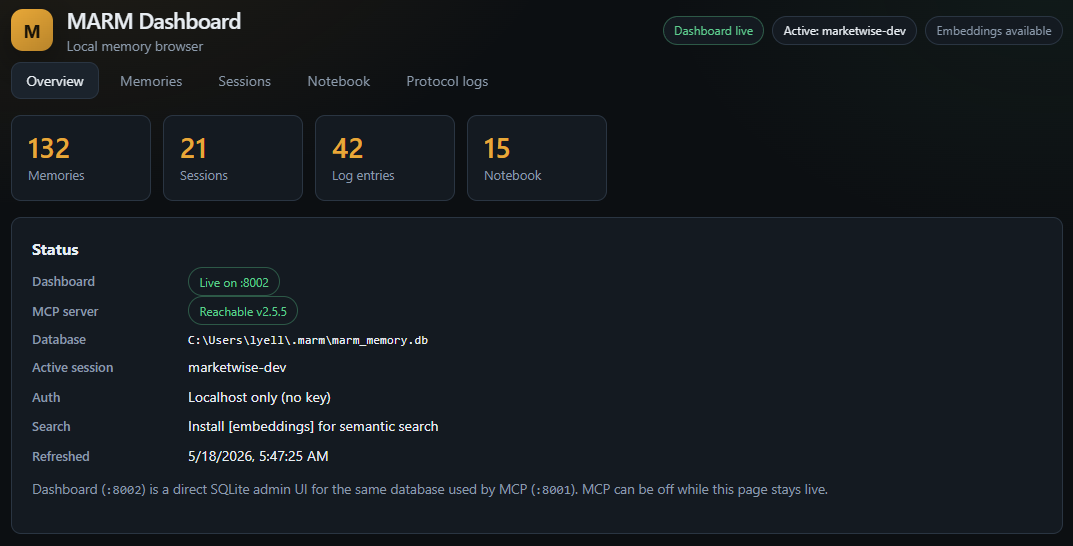
A local web UI for browsing and managing your MARM memory — separate from the MCP server, reads and writes the same ~/.marm/marm_memory.db.
| What it gives you | How it works |
|---|---|
| Browse/search/edit all memories | Direct SQLite — no MCP required |
| Manage sessions and protocol logs | Runs on port :8002 alongside MCP on :8001 |
| Notebook CRUD with inline editor | Same auth model (MARM_API_KEY) as the MCP server |
| Delete-all with count confirmation | Docker image included; WAL mode handles concurrent access |
# Quick start (pip)
cd marm-dashboard
pip install -e .
python -m marm_dashboard --open
# Docker (same key and volume as MCP)
docker build -t marm-dashboard:local ./marm-dashboard
docker run --rm -p 127.0.0.1:8002:8002 \
-e MARM_API_KEY=your-key \
-v ~/.marm:/home/marm/.marm \
marm-dashboard:localSee marm-dashboard/README.md for the full guide.
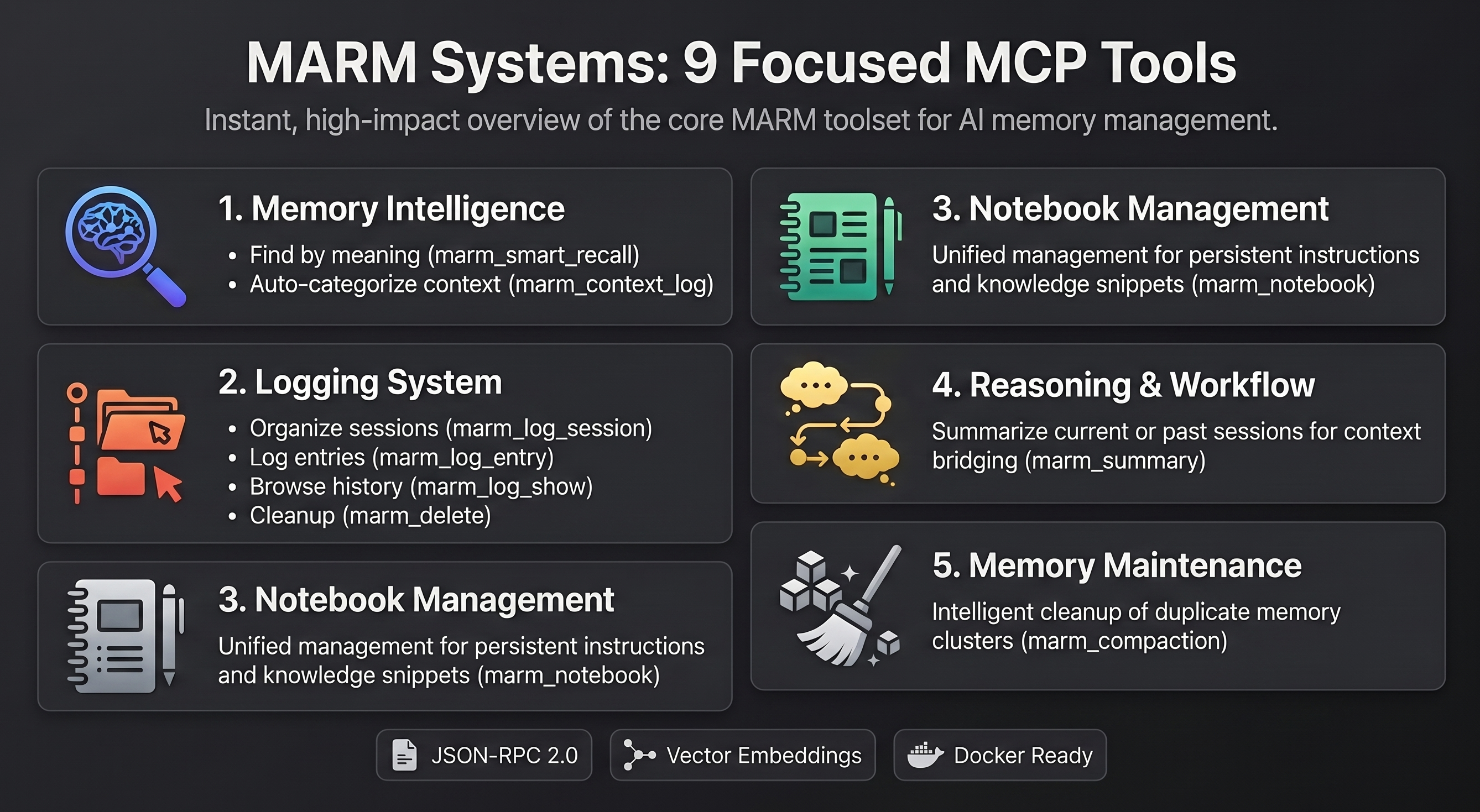
💡 Pro Tip: You don't need to manually call these tools! Just tell your AI agent what you want in natural language:
- "Claude, log this session as 'Project Alpha' and add this conversation as 'database design discussion'"
- "Remember this code snippet in your notebook for later"
- "Search for what we discussed about authentication yesterday"
The AI agent will automatically use the appropriate tools. Manual tool access is available for power users who want direct control.
Architecture note: MARM groups related operations behind a single dispatching tooling to keep MCP discovery lean without hiding behavior. Domain-specific tools such as marm_notebook(action=...), marm_delete(type=...), and marm_compaction(action=...) group closely related operations behind explicit parameters, while recall, logging, and summaries stay separate so agents still choose the right capability clearly. This design keeps the MCP schema compact while preserving full functionality.
| Category | Tool | Description |
|---|---|---|
| Memory Intelligence | marm_smart_recall |
AI-powered semantic similarity search across all memories. Supports global search with search_all=True flag |
marm_context_log |
Intelligent auto-classifying memory storage using vector embeddings | |
| Logging System | marm_log_session |
Create or switch to named session container |
marm_log_entry |
Add structured log entry with auto-date formatting | |
marm_log_show |
Display all entries and sessions (filterable) | |
marm_delete |
Delete a log session, log entry, or notebook entry (type="log"|"notebook") |
|
| Reasoning & Workflow | marm_summary |
Generate context-aware summaries with intelligent truncation for LLM conversations |
| Notebook Management | marm_notebook |
Unified notebook tool: add, use, show, status, or clear entries with action="add"|"use"|"show"|"status"|"clear" |
| Memory Maintenance | marm_compaction |
Unified compaction workflow with action="status"|"candidates"|"review"|"stage"|"apply"|"discard" for agent-assisted memory cleanup |
Internal automation: lifecycle initialization, documentation refresh, current date context, serialized write queue handling, and system checks are handled by the server instead of exposed as AI-facing tools. Optional compaction can detect duplicate memory clusters and nudge the connected agent to summarize them through marm_compaction. For server status, use the dashboard health panel or curl http://localhost:8001/health.
MARM keeps the AI-facing surface small while the server handles the infrastructure work:
- Write stability: SQLite WAL mode, connection pooling, and a serialized write queue are enabled for normal use.
- Swarm control: HTTP presets tune shared access: default
80 RPM,--swarm200 RPM,--swarm-max600 RPM, and--trusteddisables rate limiting for private deployments. - Cleaner recall: semantic search, write-time consolidation, and optional compaction reduce duplicate/noisy memories over time.
- Safe defaults: local pip binds to
127.0.0.1; Docker HTTP requiresMARM_API_KEY; STDIO stays private and keyless.
For deeper architecture, configuration, and workflow guidance, use MCP-HANDBOOK.md and FAQ.md.
MARM is open to useful contributions: bug reports, install feedback, documentation fixes, client connection notes, performance testing, and focused pull requests.
Good places to help:
- Test MARM with more MCP clients and IDE agents
- Improve install docs and platform-specific setup notes
- Report bugs with clear reproduction steps
- Suggest practical memory workflows and tool improvements
- Submit small, focused pull requests
See CONTRIBUTING.md for the full contribution guide.
Help build the future of AI memory - no coding required!
Connect: MARM Discord | GitHub Discussions
- Try the MCP server and share your experience
- Star the repo if MARM solves a problem for you
- Share on social - help others discover memory-enhanced AI
- Open issues with bugs, feature requests, or use cases
- Join discussions about AI reliability and memory
If MARM helps with your AI memory needs, please star the repository to support development!
This project is licensed under the MIT License. Forks and derivative works are permitted. However, use of the MARM name and version numbering is reserved for releases from the official MARM repository. Derivatives should clearly indicate they are unofficial or experimental.
- MCP-HANDBOOK.md - Complete MCP server usage guide with commands, workflows, and examples
- PROTOCOL.md - MCP operating protocol
- FAQ.md - Answers to common questions about using MARM
- INSTALL-DOCKER.md - Docker deployment (recommended)
- INSTALL-WINDOWS.md - Windows installation guide
- INSTALL-LINUX.md - Linux installation guide
- INSTALL-PLATFORMS.md - Platform installation guide
- README.md - This file - ecosystem overview and MCP server guide
- CONTRIBUTING.md - How to contribute to MARM
- CHANGELOG.md - Version history and updates
- ACKNOWLEDGMENTS.md - Contributors and acknowledgments
- ROADMAP.md - Planned features and development roadmap
- LICENSE - MIT license terms
mcp-name: io.github.Lyellr88/marm-mcp-server