


Code syntax highlighting with Shiki highlighter in JavaScript and Vue 3 with CDN (line numbers css).
<link rel="preconnect" href="https://fonts.googleapis.com">
<link rel="preconnect" href="https://fonts.gstatic.com" crossorigin>
<link href="https://fonts.googleapis.com/css2?family=JetBrains+Mono:ital,wght@0,100..800;1,100..800&family=Merriweather:ital,opsz,wght@0,18..144,300..900;1,18..144,300..900&family=Poppins:ital,wght@0,100;0,200;0,300;0,400;0,500;0,600;0,700;0,800;0,900;1,100;1,200;1,300;1,400;1,500;1,600;1,700;1,800;1,900&display=swap" rel="stylesheet">
<script type="module">
import { codeToHtml } from "https://esm.sh/shiki@3.2.1"
const all = document.querySelectorAll("code")
all.forEach(async (f) => {
const theme = [
"everforest-dark", "everforest-light", "vitesse-dark", "github-light",
"gruvbox-dark-medium", "gruvbox-dark-soft", "gruvbox-light-soft", "laserwave",
"slack-ochin", "plastic", "kanagawa-dragon", "kanagawa-wave", "vitesse-light",
"one-dark-pro", "synthwave-84", "material-theme", "material-theme-darker",
"rose-pine", "rose-pine-moon", "rose-pine-dawn"
]
let code = f.innerText
f.innerHTML = await codeToHtml(code, { lang: "js", theme: theme[0] })
})
</script>
<style>
h1 {
font-family: Poppins;
}
p {
font-size: 16px;
font-family: Poppins;
}
pre {
float: left;
width: 100%;
padding: 5px;
border-radius: 3px;
box-sizing: border-box;
background: #0f0f0f;
}
code {
font-family: "JetBrains Mono";
}
.shiki {
margin: 0px;
display: inline;
box-sizing: border-box;
font-family: "JetBrains Mono";
font-size: 16px;
padding: 0px 10px 0px 10px;
overflow-x: auto;
scrollbar-width: thin;
/* background: #222221 !important; */
}
.code {
font-family: "JetBrains Mono";
background: #21252b;
color: #E5C07B;
padding: 3px;
border-radius: 3px
}
/* Line numbers css */
pre {
counter-reset: line;
}
.line {
padding: 3px;
counter-increment: line;
/* Line bottom border */
float: left;
width: 100%;
border-bottom: 1px solid #343c43;
}
.line:before {
float: left;
content: counter(line);
margin-right: 10px;
width: 35px;
color: #666;
}
.line:before {
--webkit-user-select: none;
}
</style>
<h1>Shiki Highlighter</h1>
<pre>
<code>
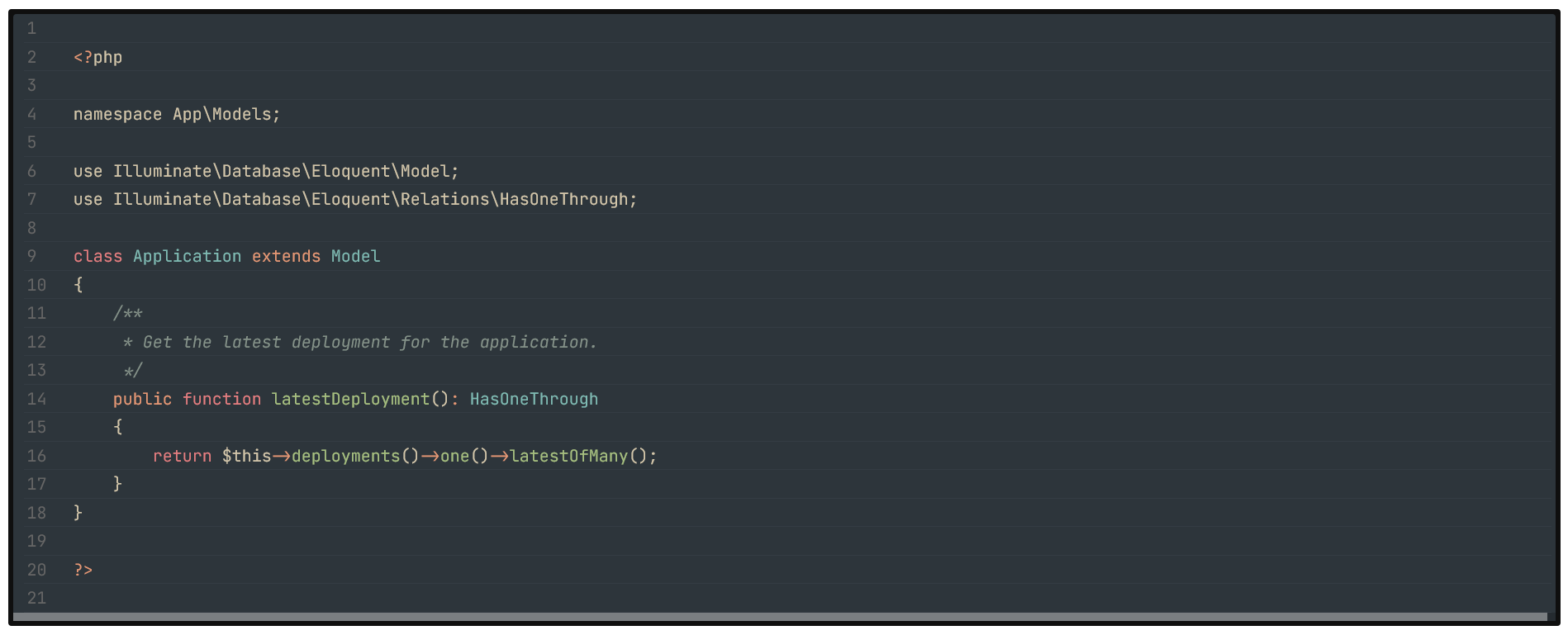
<?php
namespace App\Models;
use Illuminate\Database\Eloquent\Model;
use Illuminate\Database\Eloquent\Relations\HasOneThrough;
class Application extends Model
{
/**
* Get the latest deployment for the application.
*/
public function latestDeployment(): HasOneThrough
{
return $this->deployments()->one()->latestOfMany();
}
}
?>
</code>
</pre>
<p>Lorem ipsum dolor sit amet consectetur, adipisicing elit.<span class="code">.active{color: #f25; padding: 10px 20px;}</span>Lorem ipsum dolor sit amet consectetur adipisicing elit.</p>
<!DOCTYPE html>
<html lang="en">

<head>
    <meta charset="UTF-8">
    <meta name="viewport" content="width=device-width, initial-scale=1.0">
    <title>Laravel validation errors</title>

    <style>
        @import url('https://fonts.googleapis.com/css2?family=Fira+Code:wght@300..700&family=JetBrains+Mono:ital,wght@0,100..800;1,100..800&family=Poppins:ital,wght@0,100;0,200;0,300;0,400;0,500;0,600;0,700;0,800;0,900;1,100;1,200;1,300;1,400;1,500;1,600;1,700;1,800;1,900&family=VT323&display=swap');

        :root {
            /* doesn't matter here plugin get it from theme style */
            --shiki-dark: #dbd7ca;
            --shiki-dark-bg: #131313;
            --shiki-dim: #2e3440;
            --shiki-dim-bg: #131313;
        }

        body {
            padding-inline: 50px;
            color: #000;
            background: #fff;
            font-family: Poppins, monospace;
        }

        h1 {
            float: left;
            width: 100%;
            font-size: 40px;
            margin-top: 50px;
        }

        p {
            float: left;
            width: 100%;
        }

        .btn-toggle {
            position: fixed;
            top: 10px;
            right: 10px;
            font-size: 14px;
            font-weight: 300;
            letter-spacing: 1px;
            color: #fff;
            background: #131313;
            border-radius: 15px;
            padding: 10px 15px;
            border: none;
            cursor: pointer;
        }

        pre {
            float: left;
            width: 100%;
            border-radius: 5px;
            border: 10px solid #fbfbfb;
        }

        code {
            float: left;
            width: 100%;
            min-height: 100px;
            padding: 20px;
            box-sizing: border-box;
            border-radius: 5px;
            font-family: "VT323", system-ui;
            font-family: "JetBrains Mono", consolas, system-ui;
            background-color: #dbd7ca66;
            /* background-color: #f6f6f6; */
            overflow: auto;
            scrollbar-width: thin;
        }

        .shiki {
            float: left;
            width: 100%;
        }

        body.dark .shiki,
        body.dark .shiki span,
        body.dark code {
            color: var(--shiki-dark) !important;
            background-color: var(--shiki-dark-bg) !important;

            /* font-style: var(--shiki-font-style) !important;
            font-weight: var(--shiki-font-weight) !important;
            text-decoration: var(--shiki-text-decoration) !important; */
        }

        body.dim .shiki,
        body.dim .shiki span,
        body.dim code {
            color: var(--shiki-dim) !important;
            background-color: var(--shiki-dim-bg) !important;

            /* font-style: var(--shiki-font-style) !important;
            font-weight: var(--shiki-font-weight) !important;
            text-decoration: var(--shiki-text-decoration) !important; */
        }
    </style>

    <script>
        function decodeHTMLEntities(text) {
            var textArea = document.createElement('textarea');
            textArea.innerHTML = text;
            return textArea.value;
        }

        function encodeHTMLEntities(text) {
            var textArea = document.createElement('textarea');
            textArea.innerText = text;
            return textArea.innerHTML;
        }

        let theme = 'light'

        function toggleTheme() {
            document.body.classList.remove('light')
            document.body.classList.remove('dark')
            document.body.classList.remove('dim')

            if (theme == 'dim') {
                theme = 'light'
            } else if (theme == 'dark') {
                theme = "dim"
            } else if (theme == 'light') {
                theme = "dark"
            }

            document.body.classList.add(theme)
        }
    </script>
</head>

<body>
    <!-- <button onclick="document.body.classList.toggle('dark')" class="btn-toggle">Toggle Dark</button> -->
    <button onclick="toggleTheme()" class="btn-toggle">Toggle Theme</button>

    <h1>How to get the first error from Request Validation in Laravel</h1>

    <p>Jeżeli chcesz wyświetlić tylko pojedyńczy błąd walidacji danych wejściowych użyj parametru bail.</p>
    <div id="c1"></div>

    <p>Wyświetlaj tylko pojedyńczy błąd walidacji z FormRequest.</p>
    <div id="c2"></div>

    <script type="module">
        import { codeToHtml } from 'https://esm.sh/shiki@v2.0.1'

        async function textToCode(code, id = 'c1', lang = 'php') {
            // Highlight
            let el = document.getElementById(id)
            el.innerHTML = await codeToHtml(code, {
                lang: lang,
                themes: {
                    light: 'vitesse-light',
                    dark: 'vitesse-dark',
                    dim: 'everforest-dark',
                },
                defaultColor: 'light',
            });

            // Copy to clipboard
            let cp = document.createElement("div")
            cp.classList.add('codecopy')
            cp.innerText = 'copy'
            cp.dataset.code = code
            cp.addEventListener('click', () => {
                let c = cp.dataset.code
                navigator.clipboard.writeText(c)
                alert('Copied to clipboard')
            })
            el.appendChild(cp)
        }


        textToCode(`<?php

class UserController extends Controller {

    public function uploadAvatar(Request $request) {
        $request->validate([
            'avatar' => 'bail|required|image|mimes:png|max:2048|dimensions:max_width=256,max_height=256',
        ]);
    }
}`, 'c1', 'php');


        textToCode(`<?php

class UploadRequest extends FormRequest {

    protected $stopOnFirstFailure = true;

    public function authorize() {
        return true; // Allow all
    }

    public function rules() {
        return [
            'avatar' => 'required|image|mimes:png|max:2048|dimensions:max_width=512,max_height=512',
        ];
    }
}`, 'c2', 'php');
    </script>

    <p><a href="https://textmate-grammars-themes.netlify.app/?theme=github-light&grammar=javascript" target="_blank">Theme styles</a></p>
</body>

</html>const myTheme = {
name: 'my-theme',
settings: [
{
scope: ['keyword', 'storage.type'],
settings: { foreground: '#FD8DA3' }
},
{
scope: ['string', 'entity.name.tag'],
settings: { foreground: '#77D5A3' }
},
{
scope: ['entity.name.function', 'entity.name'],
settings: { foreground: '#BD9CFE' }
},
{
scope: ['variable'],
settings: { foreground: '#92A9FF' }
},
]
}